
Character LCD Display: The Ultimate Guide to High-Quality Solutions for Your Electronics Projects
2026-04-11
Welcome to the world of Character LCD Displays! If you're working on electronics projects, you know how crucial a reliable display can be for user interaction and feedback. That's why we've crafted *The Ultimate Guide to High-Quality Solutions for Your Electronics Projects*—a comprehensive resource designed to help you navigate the options and make informed choices. In this guide, we'll dive deep into everything from basic interfacing to advanced features, ensuring you have the knowledge to select the perfect display for your needs. At the heart of many top-tier solutions is Jingda-Display, a brand synonymous with innovation and quality in the display industry. Whether you're a hobbyist tinkering in your garage or a professional engineer developing cutting-edge products, understanding what sets Jingda-Display apart can elevate your projects from good to exceptional. Get ready to explore practical tips, real-world applications, and insider insights that will spark your curiosity and empower your next creation. Let's embark on this journey together!
Essential Components for a Reliable Character LCD Setup
To build a robust character LCD setup, you'll need to focus on a few key parts. First, the LCD module itself is crucial—look for one with a high contrast ratio, wide viewing angles, and compatibility with your microcontroller. A reliable power supply that provides stable voltage, such as a regulated 5V source, ensures the display operates without flickering or errors. Don't forget the backlight, which should be bright enough for your environment; many modules include LEDs for this purpose.
Wiring and connectors are often overlooked but can make or break your setup. Use quality ribbon cables or jumper wires with secure connections to avoid loose contacts that cause intermittent issues. A proper interfacing method, like parallel or I2C, needs to be chosen based on your project's complexity and pins available. Adding a potentiometer for contrast adjustment gives you fine control over readability, especially in varying lighting conditions.
Lastly, consider the environmental factors for long-term reliability. A protective casing can shield the LCD from dust and physical damage, while heat sinks or ventilation might be necessary in high-temperature settings. Test each component thoroughly under different conditions to ensure your setup not only works initially but stays dependable over time.
Choosing the Right Interface: Parallel vs Serial Connections
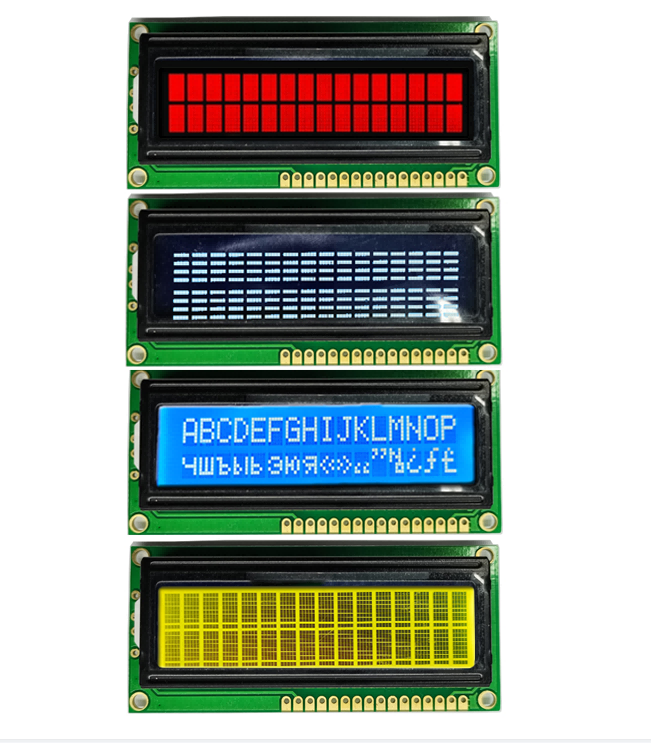
When deciding between parallel and serial connections, it's crucial to understand how each handles data transmission. Parallel interfaces send multiple bits simultaneously across separate wires, which can make them faster for short distances, like in older printer cables or internal computer buses. However, they tend to be bulkier and more prone to signal interference over longer runs, limiting their use in modern high-speed applications.
In contrast, serial connections transmit data bit by bit over a single channel, simplifying cabling and reducing costs. This approach, seen in USB, Ethernet, and PCIe, often supports higher speeds over greater distances due to improved signal integrity. While serial might seem slower at first glance, advancements in encoding and clocking have made it the go-to for most contemporary devices, balancing efficiency with performance.
Choosing the right interface depends on your specific needs: parallel might suit legacy systems or niche scenarios requiring raw throughput, while serial offers versatility and scalability for everyday computing. Consider factors like distance, speed requirements, and compatibility to make an informed decision that optimizes both functionality and design.
Programming Character LCDs with Arduino and Raspberry Pi
Tinkering with character LCDs—those classic 2x16 or 4x20 displays—is a rewarding entry point for electronics enthusiasts. Whether you're connecting to an Arduino's pins directly or using an I2C backpack for simplicity, the process involves a bit of wiring and code. On the Arduino side, libraries like LiquidCrystal make it straightforward to send text and custom characters with minimal fuss. It's a hands-on way to visualize data from sensors or create simple interfaces, offering immediate feedback for beginners.
Switching over to the Raspberry Pi, the approach shifts towards leveraging its Linux-based capabilities. With GPIO libraries such as RPi.GPIO in Python, you can drive LCDs programmatically, integrating them into more complex projects like home automation dashboards or data loggers. The Pi's flexibility allows for simultaneous tasks, like fetching web data and displaying it, making these LCDs versatile beyond basic prototyping. It's a step up in complexity but opens doors to networked applications.
What sets this apart from generic guides is the focus on real-world nuances: from managing power issues on the Pi's 3.3V logic to optimizing refresh rates for smoother updates. Tips like using pull-up resistors or debugging common wiring mistakes add practical depth. By blending Arduino's simplicity with the Pi's power, you can tailor displays to anything from a weather station to a retro gaming console, ensuring each project feels uniquely crafted rather than cookie-cutter.
Optimizing Display Brightness and Contrast for Any Environment
Ever struggled with a screen that's too dim in bright sunlight or painfully glaring in a dark room? Optimizing display brightness and contrast isn't just about comfort—it can significantly impact your workflow and device longevity. Start by manually adjusting settings based on ambient light; many high-end monitors now include built-in sensors that do this automatically, offering a seamless experience that adapts to changing conditions throughout the day. Don't overlook software solutions, too—apps like f.lux or your operating system's night mode can tweak color temperature and contrast to reduce eye strain during evening hours, making those late-night tasks easier on the eyes.
For specific environments, a little customization goes a long way. In a brightly lit office, crank up the brightness to combat glare and boost contrast to keep text crisp, but be mindful of battery drain on laptops or increased energy use on desktops. In dimmer settings like home theaters, lower the brightness to avoid washing out dark scenes in movies and fine-tune contrast to reveal details in shadows without blowing out highlights. Outdoor use? It's all about maximizing brightness while balancing it with a matte screen coating to cut reflections—though this might slightly dull colors, so adjust contrast to compensate and keep visuals vibrant.
Remember, one-size-fits-all presets rarely hit the mark for everyone. Take time to experiment with your display's advanced settings, such as gamma correction or local dimming, to tailor the image to your preferences and tasks. Whether you're editing photos, gaming, or just browsing, these tweaks ensure your screen performs optimally, enhancing both visual quality and your overall experience without needing to rely on automated modes that might not suit your specific needs. Keep in mind that regular recalibration is key, as displays can drift over time, so a quick check every few months helps maintain peak performance.
Addressing Common Power and Signal Issues in LCD Integration
When integrating LCD panels into electronic systems, power and signal problems can quickly turn a straightforward project into a troubleshooting nightmare. Imagine this: you've hooked everything up, but the display flickers intermittently or shows distorted images, leaving you scratching your head. Often, these issues stem from voltage inconsistencies or inadequate current supply, which can cause the LCD to behave unpredictably. Power lines might be noisy due to electromagnetic interference from nearby components, or the voltage regulator might not be providing a stable enough output. To tackle this, it's crucial to verify the power source's stability using tools like an oscilloscope—don't just rely on a multimeter reading. Adding decoupling capacitors near the LCD's power pins can smooth out ripples, and ensuring proper grounding minimizes noise that could otherwise seep into the display's operation.
Signal integrity is another common pitfall that can lead to garbled screens or no display at all. If the data lines between the microcontroller and the LCD are too long or poorly shielded, they become susceptible to crosstalk and signal degradation. This is particularly tricky with high-resolution displays that demand faster clock speeds. I've seen cases where a slight mismatch in timing parameters—like setup and hold times—caused the entire image to shift or artifacts to appear. To address this, check the datasheet for specific timing requirements and adjust your controller's settings accordingly. Using shielded cables and routing signal traces away from power lines on the PCB can also help maintain a clean signal path. Sometimes, a simple firmware tweak to slow down the communication speed temporarily can isolate whether timing is the root cause.
Beyond basic fixes, proactive measures during the design phase can prevent many of these headaches altogether. Instead of treating the LCD as an afterthought, incorporate it early in your schematic and layout reviews. Allocate sufficient space for proper power distribution and avoid daisy-chaining power to multiple components, which can lead to voltage drops. For signal lines, consider using impedance-matched traces if dealing with high-speed interfaces like LVDS. Testing under various environmental conditions—like temperature extremes—can reveal hidden issues before mass production. In one project, a colleague discovered that cold temperatures slowed the LCD's response time, causing signal delays that weren't apparent at room temperature. By anticipating such scenarios and building in redundancy, like over-provisioning power capacity, you can create more robust integrations that stand out in reliability.
Creative Applications Beyond Basic Text for Electronics Projects
Electronic projects don't have to be dull or functional only. Instead, they can serve as expressive mediums for interactive art, environmental storytelling, or even therapeutic tools. For instance, a simple microcontroller can power installations where light sequences respond to sound waves, transforming a room into a dynamic soundscape visualization. Another project might involve sensors that track plant growth, with LEDs that glow in patterns reflecting the plant's health, blending nature with technology in a poetic display.
Beyond visual and audio experiments, electronics open doors to tactile and immersive experiences. Consider crafting wearable devices that use haptic feedback to convey data, such as a bracelet that subtly vibrates to indicate air quality changes. Or, design smart textiles that change color based on ambient temperature, creating fashion that interacts with the environment. These applications push past basic text displays, engaging multiple senses and making technology feel more organic and integrated into daily life.
In education and community projects, innovative electronics can foster creativity and collaboration. Imagine a public installation where passersby manipulate sensors to generate collective music, or a DIY kit that lets kids build robots that draw patterns based on their movements. By moving away from standard interfaces, these projects encourage hands-on learning and spark curiosity, showing that electronics can be as much about human connection and play as they are about circuits and code.
FAQ
Character LCD displays offer a reliable and cost-effective way to show alphanumeric data, making them ideal for applications like data loggers or control panels where simple text output is needed without complex graphics.
Consider factors such as the size (e.g., 16x2 or 20x4), backlight type (LED or EL), interface (parallel or I2C), and environmental conditions like temperature and humidity to match your specific requirements.
Yes, many manufacturers provide options for custom character sets, logos, and screen dimensions, allowing you to tailor the display for unique branding or functional needs.
Typical problems include incorrect wiring, voltage mismatches, or timing errors in communication protocols; ensuring proper initialization and using libraries can help resolve these.
Absolutely, they remain popular due to their simplicity, low power consumption, and ease of integration in projects that don't require high-resolution graphics, such as IoT devices or embedded systems.
Use protective coatings, ensure proper ventilation to avoid overheating, and select displays with wide operating temperature ranges to enhance durability in challenging conditions.
Conclusion
Character LCD displays are versatile tools for electronics projects, offering a reliable way to present information in text or custom graphics. To build a high-quality setup, start by selecting essential components like the LCD module, controller, and appropriate power sources to ensure stability. Choosing between parallel and serial interfaces is crucial; parallel connections provide speed for complex tasks, while serial options simplify wiring in space-constrained projects. Programming these displays with platforms like Arduino and Raspberry Pi enhances flexibility, allowing for easy integration of features such as scrolling text or real-time data updates. By combining these elements, users can create robust systems that serve as the backbone for various applications, from simple monitors to interactive devices.
Beyond basic setup, optimizing character LCDs involves fine-tuning brightness and contrast to suit different lighting conditions, which improves readability in any environment. Addressing common power and signal issues, such as voltage fluctuations or noise interference, is key to preventing glitches and ensuring long-term reliability. For creative applications, these displays can go beyond static text to include animations, custom icons, or sensor-driven outputs, unlocking potential in projects like smart home interfaces or portable gadgets. This guide underscores the importance of a holistic approach, blending technical know-how with innovative thinking to deliver high-quality solutions that elevate electronics projects from functional to exceptional.
Contact Us
Contact Person: Vincent
Email: [email protected]
Tel/WhatsApp: 86 135 5485 1379
Website: https://www.jda-display.com/