
Professional FPV Drone Training Simulator for Mastering Precision Flight
2026-08-16
Every seasoned FPV pilot knows that precision isn't a gift—it's a discipline forged in repetition. Yet, the gap between simulator hours and real-world confidence remains a frustrating hurdle for many. Enter SRIZFLY, a professional FPV drone training simulator built not just to emulate flight, but to dissect it: from micro-corrections in throttle control to the split-second decisions that separate a clean line from a crash. If you've ever felt your stick movements betray your intentions mid-gap, this might be the missing link between practice and mastery.
Why Precision Flight Is Harder Than It Looks in FPV
Spend ten minutes trying to hover inside a phone booth and you'll learn just how much the video hides. The camera lens bends the edges of the frame, so a gap that looks wide on screen is actually narrower than your prop tips. There's no depth perception, no side view, and the video link adds a delay that turns every close pass into a bet. At 30 mph, a 30 ms delay means the quad moves about 1.3 feet between what you see and what's actually happening. Precision isn't about fast reactions; it's about knowing where the quad will be before the image catches up.
Then add the air itself. Prop wash slaps back off walls and floors, shaking the quad right when you need it steady. Ground effect makes the quad float differently a few inches off the deck; battery sag under throttle means your hover point keeps changing. You're not just steering—you're constantly re-solving the throttle equation, and there's no instrument panel. It feels like trying to balance a marble on a plate while someone tilts the table under you, except the plate is moving at 60 mph.
The hardest part to explain is the mental stack. Yaw, pitch, roll, and throttle aren't independent—every input changes how the others feel through the camera view. Without landmarks or peripheral vision, orientation drifts within seconds, so you're flying partly on stick memory and partly on faith. The pros make it look easy because they've crashed enough times to turn a chaotic set of corrections into one smooth, automatic line.
The Physics Engine That Makes Simulator Training Worth Your Time
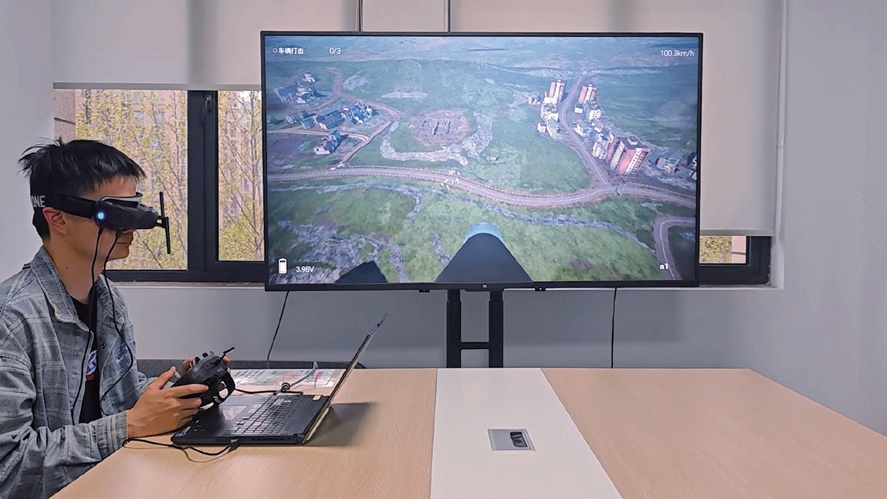
Most people assume a driving or flight simulator feels real because of the graphics, but that's only half the story. The actual value comes from the physics engine running underneath. It's the difference between watching a car turn and feeling the weight shift as the tires scrub for grip. A well-tuned physics engine doesn't just animate a response; it calculates forces in real time, accounting for suspension compression, brake bias, and even the way a crosswind pushes against the side of the fuselage. That level of detail is what makes the next lap or approach feel genuinely instructive instead of just visually convincing.
What this means for training is that mistakes carry weight. In a simulator backed by a rigorous physics model, entering a corner too hot doesn't just show a red warning; it sends you wide, scrubs off speed, and maybe unsettles the rear end. That immediate, physical consequence builds a feedback loop you can't get from watching videos or clicking through menus. Whether you're practicing an emergency descent or learning to trail-brake into a hairpin, the subtle cues from the physics engine teach your hands and feet what "just right" feels like. You start to anticipate snap oversteer or a stall buffet before it fully develops.
Cheap simulators often fail because their physics are canned. Input goes in, a pre-recorded animation comes out, and the whole exercise becomes a chore. But a proper engine turns repetition into adaptation. You learn from the way the machine resists, recovers, or lets go at the limit. That's why hours in a well-built simulator feel less like playtime and more like deliberate practice. The physics becomes the instructor you don't see, constantly correcting your instincts until the real thing feels familiar.
Hover Practice, Throttle Control, and the Art of Micro Corrections
Most pilots rush past hovering because it feels static, but that stillness is where throttle discipline gets built. Put the aircraft at eye level and try to hold a one-foot box without drifting. You'll notice the throttle never really sits still—it breathes with tiny blips that keep altitude from sagging or ballooning.
Once the hover feels less like balancing a plate and more like resting your hand on a steady surface, start playing with small climbs and descents. The trick isn't moving the stick a lot; it's learning how much is just enough to start or stop a vertical movement. Overshooting usually comes from correcting too late, not too much.
Micro corrections are the quiet part of flying nobody posts about. When the nose yaws a degree or a gust shoves the disc sideways, you're not flying the aircraft back to center—you're catching the drift before it becomes a heading change. Keep your fingers moving in almost imperceptible nudges, and eventually the machine feels less like it's being commanded and more like it's reading your intent.
From Simulator to Real Quad: Bridging the Gap Without Crashing
The moment a policy leaves the tidy world of simulation, every assumption it leaned on starts to fray. Motor lag, propeller flex, slightly skewed IMU readings, and even the texture of the floor beneath the downdraft all become liabilities. Instead of treating these as noise to be filtered out, the better move is to bake that uncertainty into training: randomize masses, surface friction, sensor delays, and actuator response curves until the policy stops relying on any single calibration.
Crashing in the real world is expensive, but crashing in simulation is free—if you make the simulation honest. Rather than chasing photorealistic rendering, focus on the physical parameters that matter for control: torque ripple, battery sag, and the slight asymmetry from wiring. Build a handful of randomized environment variants, and only promote a policy that survives the worst ones without a single reset. That survival threshold is the actual bridge: it filters out brittle behavior long before propellers meet concrete.
The final shift often comes down to a small learned correction layer that adapts online. Fly the sim-trained policy on the real quad in a constrained space, collect the residual error between predicted and actual states, and fit a lightweight model that compensates for whatever the simulator missed. This keeps the core policy intact while giving the physical system room to breathe. When that correction stabilizes within a few seconds, you know the gap has shrunk from a chasm to a crack.
Race Gates and Freestyle Tricks: Training Modules That Actually Push You
Most gate training stops at running the course on repeat, but the modules here treat each gate as a decision point. You'll work short, tight sequences where the focus shifts from pure speed to early edge angle and where you release pressure between turns. One drill has you enter a three-gate combo at moderate pace and only add power after the apex of the second turn—it forces you to find speed from line choice rather than brute force.
Freestyle work follows the same logic: every trick is broken into a smaller movement chain before it goes to snow or pavement. A 360 isn't taught as a single spin but as a setup carve, a popped release, and a spotted landing. You'll spend time on flatground drills, small kickers, and box slides, but the real push comes from modules that pair a trick with a gate exit—like finishing a slalom run with a tail press over a roller or a 180 off a side hit. That combination builds the kind of board control that shows up when the course gets rutted and the landing isn't perfect.
How Professional Pilots Use Simulators to Cut Repair Costs and Build Muscle Memory
Every hour a professional pilot spends in a full-motion simulator is an hour of wear and tear avoided on a multi-million-dollar aircraft. From engine fire drills to hydraulic failures, crews rehearse emergency checklists until the correct sequence of switches and callouts becomes second nature. This deliberate repetition forges muscle memory that holds up under real-world stress, while the virtual environment swallows the mistakes that would otherwise rack up maintenance bills and ground time.
Simulators also let instructors push scenarios far beyond what any airline would risk in a real jet. A pilot can practice a rejected takeoff at maximum gross weight in a crosswind, then immediately reset and fly the same profile again with a blown tire. The fidelity of modern visual systems and motion platforms means the brain logs these repetitions as genuine experience, yet the only cost is electricity and software. Over a career, this translates into fewer hard landings, fewer overspeed events, and less strain on brakes, tires, and engines.
What often goes unnoticed is how sim time shifts the economic calculus of training itself. Instead of burning thousands of pounds of jet fuel for a three-hour practice session, a crew can accomplish the same objectives in a ground-based device. The savings compound across an entire fleet, freeing up budget for other safety improvements while still producing pilots whose hands know exactly what to do when a warning light flashes at 35,000 feet.
FAQ
The physics engine accounts for prop wash, momentum, and battery sag, so you'll notice the same small drifts and corrections you'd feel outdoors. It's not arcade-like; it punishes sloppy stick inputs just enough to build muscle memory.
It starts with a gentle hover mode and slowly introduces rates and acro, so someone with zero stick time can progress without getting overwhelmed. Experienced pilots can skip straight to manual mode and tighten their lines.
There are narrow parking garages, open fields with gates, abandoned warehouses, and a few mountain ridge lines. Each layout forces a different skill: gap judgment, altitude hold, or sharp direction changes at speed.
You can bind most USB or wireless dongles from FrSky, RadioMaster, TBS, and Spektrum. Latency stays low enough that your stick timing carries over to a real build without re-learning.
There's a ghost replay system that shows your line frame by frame, so you can spot where you drifted wide or bled too much speed. Slow-motion review makes it easier to fix tiny overcorrections.
You can dial in gust strength and direction, and the drone will get pushed around realistically. It's useful for practicing controlled descents and crosswind gates without trashing a real quad.
The trainer has optional visual cues like a center line and throttle hints that fade out as you improve. It doesn't hold your hand forever, but it gives you a reference until your instincts take over.
There's a built-in editor for placing gates, flags, and obstacles, and you can share those files with friends. The community packs include some very technical indoor courses that push precision to the limit.
Conclusion
Most newcomers to FPV assume that flying fast is the hard part, but the real challenge lies in the slow, deliberate moments—holding a hover, nudging the throttle just enough to stay in place, and correcting drift before it becomes a wobble. A professional simulator built for precision flight doesn’t just simulate gravity; it models prop wash, battery sag, and the subtle inertia of a quad that wants to slide after every input. That’s why throttle control and micro corrections become the first real test. You learn to stop overcorrecting, to wait for the quad to settle, and to make adjustments so small they’re almost invisible. It’s the difference between fighting the aircraft and simply letting it do what you ask.
Once the basics feel natural, the gap between screen and real quad gets much smaller. Modules that push you through tight race gates and freestyle trick sequences build the kind of muscle memory that survives real-world nerves. Pros don’t use these tools just for fun—they use them to crash a thousand virtual times before risking a single carbon frame. That repetition saves money, sure, but more importantly it trains your thumbs to react without thinking. By the time you plug in a real battery, the controls feel familiar, the mistakes are already made, and the flight itself becomes the reward.
Contact Us
Contact Person: Niles Liu
Email: [email protected]
Tel/WhatsApp: 8619945009803
Website: https://srizfly.com/
